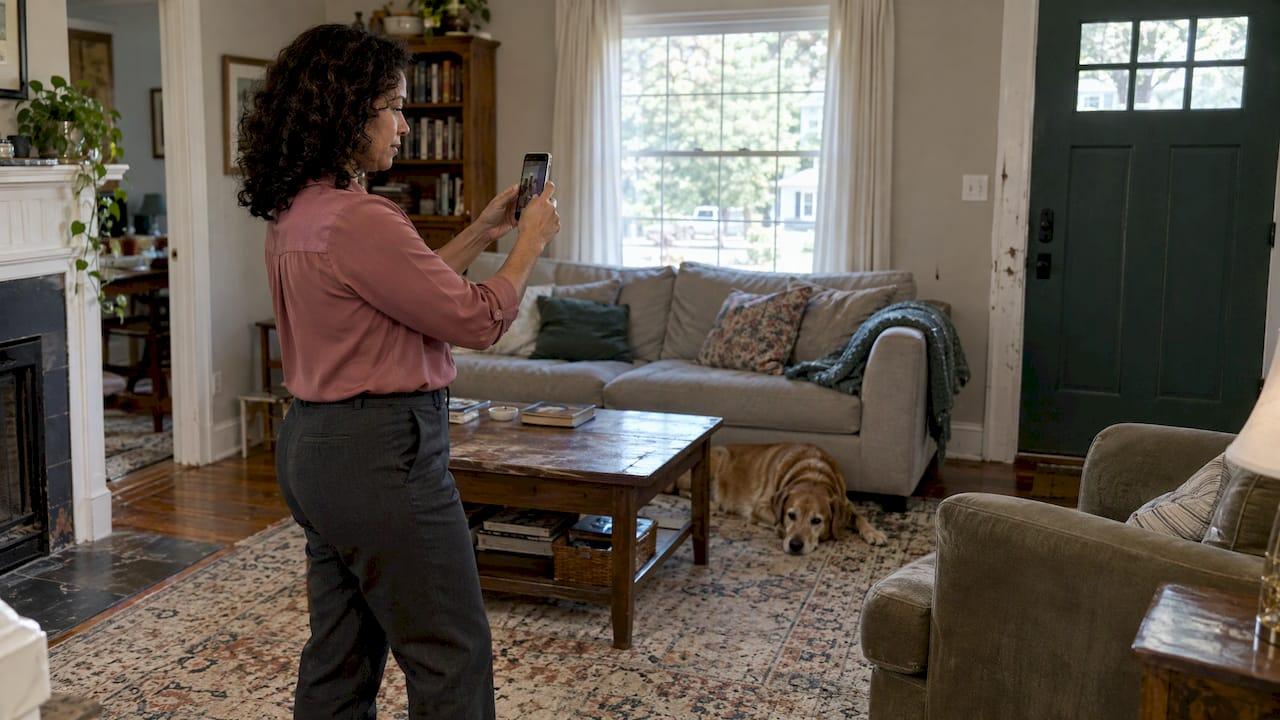
A virtual estate walkthrough is a remote tour of a loved one's home, done by live video call, a recorded video or a 3D scan. You use it to see the rooms, agree on what stays, goes or gets sold, and plan the cleanout without everyone traveling to the property. It works well as a first step. It does not replace an in-person visit for smells, structural problems or a licensed inspection.
If you are an executor living out of state, a sibling who cannot get away from work, or a social worker coordinating for a client, this guide covers how to set the walkthrough up, what to capture, how to protect privacy, and how to turn the footage into a cleanout plan.
TL;DR
- A virtual walkthrough is a live video call, a recorded video or a 3D scan of the home. A live call lets you ask for another angle on the spot.
- Prepare first: lights on, phone charged, a room order agreed and a shared list of what you want to see.
- Record keepsakes, condition, access problems and anything that needs special handling. Leave identity documents, mail and keys out of frame.
- Treat the walkthrough as a first filter. It cannot show odors, humidity or the condition of the roof, foundation, plumbing or electrical systems.
- Use the footage to sort rooms into keep, donate or sell, and remove, then request a firm quote.
Table of Contents
- What a virtual estate walkthrough is
- When a virtual walkthrough helps most
- How to prepare before the call
- What to show and document, room by room
- Protecting privacy while you record
- What a virtual walkthrough cannot tell you
- From footage to a cleanout plan
- How online estate sales fit in
- Getting a quote after your walkthrough
- Walkthrough checklist you can copy
- FAQ
- Sources
What a virtual estate walkthrough is
The term borrows from real estate. A virtual property tour is a digital version of a home that lets viewers move through it without visiting in person, in formats such as 3D walkthroughs, pre-recorded videos or live video tours.
There are two main types, and the difference matters for an estate:
- Recorded tour. The industry standards body RESO describes a virtual tour as prerecorded or pre-existing static content, such as video, 360-degree images and 3D tours. You can watch it any time and share it with the whole family.
- Live walkthrough. A livestream is real-time and interactive. RESO notes that viewers can receive customized feedback while looking at a home, which is exactly what you want when you need to say, "Can you open that closet?"
A third option is a scheduled live showing for a specific person, with an appointment and a chance to ask questions. The Greater Rochester Association of REALTORS® describes this as a virtual showing, distinct from a prerecorded tour. For a family, that translates to a booked video call with a fixed agenda.
A 3D scan goes further. One legacy-scan provider describes using a Matterport scan so an executor could answer an inventory request and relatives could virtually visit the home and choose keepsakes. Users can tag objects, add notes and measure spaces, then share the scan for remote collaboration.
When a virtual walkthrough helps most
A remote tour earns its place in a few common situations:
- The executor lives far away. You can see the house before you book travel, and decide which trip to make and when.
- Several relatives need a say. One live call lets everyone see the same room and speak up about the piano, the quilts or the china at the same moment.
- A realtor needs a fast turnaround. A walkthrough shows the volume of contents so a cleanout can be scoped before the listing photos are scheduled.
- A landlord or case manager is coordinating. Footage documents the unit's state before any work starts.
- Someone is downsizing. A parent moving to assisted living can walk a relative through the house and point to what matters to them.
Virtual tours are widely used in real estate for the same reason. Matterport's 2025 guide says they can reach out-of-state and international buyers, people with physical disabilities and people unable to attend. Families settling an estate share those constraints.
How to prepare before the call
A walkthrough goes badly when the person holding the phone does not know what you need. Ten minutes of planning saves a second call.
Agree on the goal and the people
Decide what the walkthrough is for: a keepsake pass, a scope for a cleanout quote, a condition record, or all three. List who needs to attend. The NAR's practical guide to estate and probate cleanouts starts the same way: align on goals, timeline and decision-makers before any work begins.
If you are an executor, confirm your legal authority before anything leaves the house. Our guide to probate house cleanouts and authority before donations explains why this comes first, and our estate cleanout checklist covers when to wait for probate.
Set up the person on site
Whoever carries the phone controls what you see. Realtor.com's advice on digital walkthroughs makes the point directly and suggests asking them to turn on every light before you begin, so walls, ceilings and floors are visible in detail.
A few more practical steps:
- Charge the phone and clear storage. A long walkthrough of a full house produces a large video file.
- Silence interruptions. Zillow's video tour tips suggest putting the phone in airplane mode when recording so calls and notifications do not break the take. For a live call, use Wi-Fi in the house if it is still connected, or a strong cellular signal.
- Narrate as you go. The same guide recommends talking while filming. Say the room name and what you are looking at so the file is searchable later.
- Open things up. Doors, closets, cabinets, the attic hatch and the basement door should be opened ahead of time.
- Agree on a route. Start at the front door and move room by room, ending with the garage, basement, attic and any outbuildings or storage units.
Make a shared list
Before the call, each family member writes down the items they want to see or ask about. Put the list in a shared document. During the call, tick items off and note where each one is located.
What to show and document, room by room
A good walkthrough captures four things: keepsakes, condition, access and special handling.
Keepsakes and valuables
For each room, pause on furniture, artwork, jewelry boxes, collections, books, photo albums, tools and anything with a family story. Ask the person to hold up small items and turn them over. If you plan to sell, a wide shot followed by a close-up of marks, labels and signatures helps later.
Our article on protecting sentimental clutter with donation-first documentation shows how to label and log items that matter before anything is moved.
Property condition
A move-in and move-out inspection checklist from a rental-management company recommends photographing existing damage and checking walls, ceilings, floors, windows, doors, appliances, bathrooms, smoke and CO alarms, HVAC and exterior features. That list suits an estate property too. Ask for slow pans across ceilings for stains, along baseboards for moisture marks and across floors for soft spots.
A quick room-by-room guide:
| Area | What to ask the camera holder to show |
|---|---|
| Entry and living areas | Furniture volume, wall and ceiling condition, windows, floors |
| Kitchen | Appliances, cabinets, pantry contents, under-sink area |
| Bathrooms | Ceilings, tub and shower, medicine cabinet (see privacy below) |
| Bedrooms and closets | Closet depth, stored boxes, under-bed storage |
| Basement and attic | Stacked items, water marks, access routes, stairs |
| Garage and sheds | Tools, chemicals, vehicles, paint cans, yard equipment |
| Exterior | Driveway, steps, parking for a truck, gates |
Access issues
The route matters as much as the contents. Capture the width of doorways, stair counts, narrow hallways, elevator size in an apartment or condo, the loading area and where a truck could park. If the property is in a community with gated entry or building rules, note the hours and any move-in reservation requirements. A similar point shows up in guidance on planning property access for online estate auction pickups: the logistics should be settled early, not on pickup day.
Items needing special handling
Flag these on camera so they are not missed:
- Medications, sharps and medical equipment
- Firearms or ammunition (these require lawful handling; do not move them yourself)
- Paint, solvents, pesticides, propane and other hazardous household products
- Heavy items such as safes, pianos and gym equipment
- Signs of pests, mold, standing water or biological hazards
- Heavy clutter or blocked pathways that make the home unsafe to walk through
If the footage shows heavy clutter or contamination, tell whoever is on site to stop and leave the area. Hoarding and biohazard conditions call for trained crews and protective equipment.
Protecting privacy while you record
A video of a home can reveal more than you intend, and it often gets shared with relatives, realtors and vendors. A home inventory protocol from a resilience company advises excluding identity documents, addressed mail, account or policy numbers, prescription labels, screens, keys, alarm controls and security-sensitive storage, and keeping original files protected while sharing only controlled working copies.
In practice:
- Point the camera away from desks, filing cabinets and mail piles. Mention them by voice instead ("desk in the den, papers to be reviewed by the executor").
- Skip the medicine cabinet's labels; describe the contents aloud if needed.
- Do not film keys, lockboxes, safe dials or alarm panels.
- Store the original recording in one secure place. Share trimmed copies or screenshots.
- Do not post the walkthrough on social media. An empty house with a visible address invites trouble.
What a virtual walkthrough cannot tell you
Be clear about limits so the footage is used for the right decisions. A virtual tour can help screen a property, but it cannot fully replace an in-person visit or show smells, humidity, noise, or the condition of the roof, foundation, plumbing and electrical systems. Treat it as a first filter, not a final verdict.
Realtor.com quotes a licensed agent on the same point: do not substitute a video walkthrough for a licensed inspection. The video can help you decide whether a deeper professional inspection is worth paying for, and that is where its value ends.
It also helps to have a trained person guiding the camera. One virtual-inspection firm argues that guided remote data collection reduces the chance of missed red flags compared with a generic video chat where the on-site person is only a tripod. If the on-site person is a relative who is grieving, expect them to miss things, and consider a second pass with a professional.
Practical consequences:
- Odors and air quality need someone in the room. Smoke, pet and mold odors are often the deciding factor in whether a specialty cleaning is needed.
- Structural and systems questions go to a licensed home inspector or the right trade.
- Legal and title questions go to the estate attorney, not the video.
From footage to a cleanout plan
The walkthrough pays off when you turn it into decisions. The NAR guide suggests using the walkthrough to identify clear-out zones and safety concerns, sorting with a keep, donate or sell, and remove framework, and scheduling pickups early. Then you clear, clean and prep in sequence, and close with documentation.
Here is a simple way to do it:
- Make a room log. Under each room, list the main categories: furniture, linens, kitchenware, books, tools, papers, clothing, décor.
- Tag keepsakes first. Family members claim what they want from the footage. Record each claim in writing, with who gets what and who pays shipping.
- Sort the rest into four groups: keep, donate, sell, remove. Our guide to sorting estate sale leftovers into five donation-first buckets shows how the last two groups usually shake out.
- Identify the hard parts. Basement, garage, attic, hazardous items, heavy pieces and any storage unit. Our storage unit cleanout plan for executors helps with the last one.
- Set a timeline. Work back from the closing date, the lease end or the court calendar. The estate cleanout process, steps and timeline lays out what to expect at each stage.
- Keep the record. Save the video, the room log and the claims list together. This is the paper trail you want if relatives disagree later. See our guide to estate cleanout documentation for executors.
For realtors, the realtor cleanout checklist covers the path from authority to handoff, and the real estate cleanout checklist for executors gives the nine-step version.
How online estate sales fit in
Many families ask what happens to the sellable items after the walkthrough. Online estate sales are one answer. Companies photograph and describe belongings, list them individually or in small groups, and sell them through an online bidding platform; buyers place bids during a set auction period, much like a traditional auction. A traditional on-site sale is different: shoppers walk through the home and buy at marked prices, which may be fixed, negotiated or reduced as the sale progresses.

The walkthrough is the natural starting point for either route. Clear photos, notes on condition and a list of notable pieces make the cataloging faster. Pickup is the part families underestimate: winning bidders need scheduled access to a home, so parking, stairs and entry rules from your walkthrough notes become the pickup plan.
Our services reflect both routes. On-site estate sales run on a commission of 15-35%, and online listings and consignment run on 20-40%. Estate photography and online inventory is billed at $75 per hour.
Our perspective on remote walkthroughs
Families usually reach out to us from a distance. A daughter in another state, a son who cannot take another week off, a case manager with a full caseload. They want to know what is in the house before they make a single decision, and they want to do it without feeling rushed.
We think a remote walkthrough is a good way to start, as long as it feeds into a plan. The footage tells you what the house holds. It does not tell you what the family wants. That conversation comes first, and our donation-first approach follows from it: usable items go to local charities, keepsakes are sorted with care, and nothing is hauled away without a clear record of what happened to it.
That is also why we pay attention to documentation. Executors need proof for probate, and relatives need to trust that the sorting was fair. A clear video, a room log and a written list of who claimed what protect everyone.
When a walkthrough shows heavy clutter, odors or hazards, we recommend a professional visit before anything else. We are fully insured, we keep every job discreet, and we hand the property back broom-clean.
Derek
Getting a quote after your walkthrough
A walkthrough gives you the scope. A firm quote comes from a professional walkthrough of the property, which confirms what the video suggested. Our published starting prices are one-off, per-job amounts. They are starting points, and the final figure depends on volume, access, disposal and the condition of the home.
| Service | Published starting price |
|---|---|
| Single item or small pickup | from $150 |
| Single room, garage or basement | from $295 |
| Apartment or condo cleanout | from $650 |
| Foreclosure or eviction cleanout | from $950 |
| Full house cleanout | from $1,200 |
| Hoarding cleanup | from $1,500 |
| Large estate cleanout | from $2,200 |
| Packing service | $55 per hour, per packer |
If you are still working out what to do first, our walkthrough notes translate easily into a request: room list, photos, access details and the date you need the property cleared.
We work across New Jersey, and you can see the service areas or look at local pages such as estate cleanout in Elizabeth, NJ and estate cleanout in Salem, NJ. To share your walkthrough notes and request a quote, start at Bereavement Cleanout Services.
We handle full-house and apartment cleanouts, hoarding and heavy clutter cleanup, donation runs, estate photography and online inventory, packing, estate sales and consignment. Every job starts with your priorities, and your keepsakes are set aside before anything else moves.
Walkthrough checklist you can copy
Use this before, during and after the call.
Before
- Confirm who has legal authority and who attends.
- Charge the phone, free up storage, turn on every light.
- Open closets, cabinets, and the attic and basement doors.
- Share the list of items each person wants to see.
During
- Move in the agreed order and name each room aloud.
- Pause for close-ups of keepsakes and notable pieces.
- Pan slowly across ceilings, floors and walls.
- Show doorways, stairs, parking and entry points.
- Flag hazards, medications and heavy items.
- Keep documents, mail, keys and alarm panels out of frame.
After
- Save the original file in one secure place.
- Write the room log and the keepsake claims list.
- Sort into keep, donate, sell and remove.
- Book a professional visit for odors, hazards or structural concerns.
- Request a firm quote with your notes attached.
FAQ
Can a virtual walkthrough replace an in-person visit?
No. It is a good first filter, but it cannot show odors, humidity or the state of the roof, foundation, plumbing and electrical systems. A licensed inspector handles structural questions, and a cleanout professional confirms scope and pricing on site.
Should the walkthrough be live or recorded?
Use a live call when several relatives need to weigh in, because they can ask for another angle or room instantly. Record the same call, or a separate narrated video, so you have a file to review, share in controlled form and keep for your records.
What should I leave out of the video?
Keep identity documents, addressed mail, account numbers, prescription labels, keys, alarm controls and screens out of frame. Describe sensitive items aloud instead, and store the original file securely, sharing only trimmed copies.
How do online estate sales work?
Belongings are photographed, described and listed individually or in small groups on a bidding platform. Buyers bid during a set period, and winners arrange pickup. Your walkthrough photos and notes speed up cataloging and help plan pickup access.
What do I send a cleanout company after the walkthrough?
Send your video or photos, the room log, a list of items to keep, access details such as stairs, parking and building rules, and the date you need the property cleared. That gives the crew what they need to prepare a firm quote after the site visit.
Sources
- Virtual Property Tours and Remote Valuations
- Livestream Open Houses vs. Recorded Virtual Tours (RESO)
- Virtual Tours, Open Houses & Showings Explained (GRAR)
- Introducing Legacy Scans (AfterLight)
- How to Host a Virtual Open House (Matterport)
- The Digital Walkthrough: What To Look Out for (Realtor.com)
- Video Meeting and Virtual Tour Tips (Zillow New Construction)
- Move-In/Move-Out Inspection Checklist (Pact)
- Pre-Loss Home Inventory Photo and Video Protocol (ReadyLience)
- Managing an Estate or Probate Cleanout (NAR)
- Seeing Past the Listing Photos (Valligent)
- Downsizing Made Simple: How Online Estate Sales Work