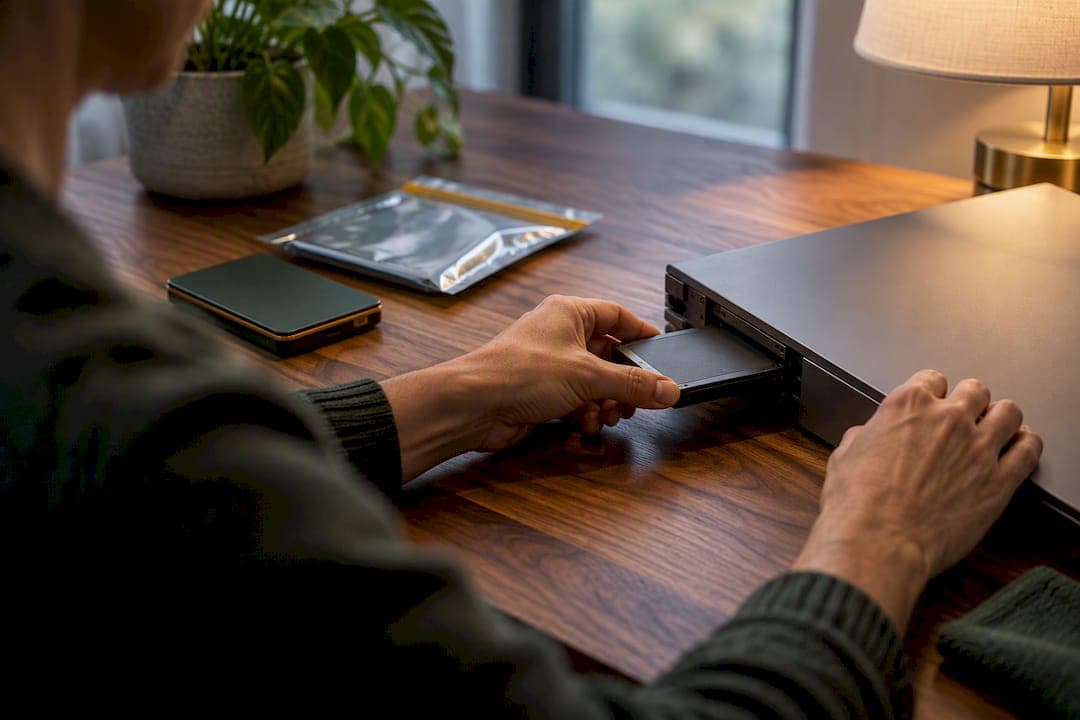
A donation-first cleanout service should sanitize or destroy every computer and storage device before it leaves the home, using clear, purge, or destroy methods drawn from NIST SP 800-88 Rev. 2, and hand you signed documentation proving it happened. When a drive is damaged or can't be reliably wiped, it gets physically destroyed instead. As the executor, you're responsible for confirming which method was used and for keeping the paperwork with the rest of the estate file.
TL;DR:
- Devices with sensitive data such as financial or medical records should undergo purge-level sanitization before donation, not just standard clearing.
- Solid-state drives often require vendor-specific secure erase or physical destruction due to their wear-leveling and remapping features.
- All devices must be signed out of accounts, labeled, and a complete device inventory created before the cleanout crew arrives to ensure thorough documentation.
- Always request signed certificates and a detailed chain-of-custody log from the provider to verify proper sanitization and responsible disposal.
- Backing up personal data before sanitization is essential, as data destruction is permanent, and incomplete backups can lead to loss of valuable information.
Table of Contents
- What a Professional Cleanout Service Actually Does With a Computer
- Clear, Purge, or Destroy: Which One Does Your Drive Need?
- Getting Ready for the Crew: Your Checklist and Questions to Ask
- What Documentation You Need and Where to Keep It
- Why a Documented, Donation-First Approach Matters
- Back Up First: Don't Let Sanitization Erase Something You Needed
- Where Wiped Devices Actually Go: Environmental Responsibility
- Where the Usual Advice on This Falls Short
- How Bereavement Cleanout Services Handles Your Electronics
- Sources
- FAQ
What a Professional Cleanout Service Actually Does With a Computer
A donation-first crew doesn't treat a laptop the same way it treats a lamp. Electronics get pulled aside early, inventoried, and handled through a distinct workflow before anything reaches a donation truck.
Here's roughly how that process runs on a well-run estate cleanout:
- Assessment and inventory: Each device is powered on if possible, checked for its storage type (hard drive, solid-state drive, or hybrid), and logged with a serial number.
- Security classification: The crew flags devices that likely held financial software, medical records, tax files, or online banking access, since those get the highest sanitization standard.
- Sanitization execution: Depending on the device, this happens on-site with certified software erasure or cryptographic erase, or the drive is pulled and sent off-site for destruction.
- Disposition routing: Sanitized machines go to donation partners or refurbishers; drives that can't be verified clean go to certified recycling instead.
The order matters here. A machine never gets boxed for a charity pickup before its drive has been verified sanitized or physically removed. That sequencing is the difference between a "donation-first" service and a company that simply hauls everything to the same truck. The FTC's own guidance on donating or selling devices makes the same point to consumers: charities and resellers expect a device to already be clean when it arrives, not something they'll fix themselves.
Clear, Purge, or Destroy: Which One Does Your Drive Need?
NIST's SP 800-88 framework breaks sanitization into three tiers, and knowing the difference helps you push back if a provider tries to cut corners.
Clear uses standard software commands to overwrite data on the drive. It's fast and adequate for low-sensitivity devices, but it's not always enough for a machine that held tax returns, medical records, or years of banking logins.
Purge applies more aggressive techniques, like cryptographic erase or vendor-specific secure-erase commands, that make data recovery infeasible even with lab-grade forensic tools. This is the tier most estate computers should get before donation, especially anything that touched a deceased person's financial accounts.
Destroy means physical destruction: shredding, crushing, or disintegrating the media so it can never be read again.
A few practical rules:
- Traditional hard drives generally respond well to purge-level software erasure.
- Solid-state drives are trickier. Wear-leveling and remapped sectors mean standard overwrite methods don't reliably reach every block on many SSDs, so vendor secure-erase tools or destruction are often the safer call.
- Damaged, corroded, or non-booting drives usually skip software entirely and go straight to destruction, since a provider can't verify a clean is complete if the drive won't respond to commands.
Pro Tip: If a device was ever used for online banking, tax prep, or medical portals, ask the provider to default to purge or destroy rather than clear. It costs little extra and removes any question later.
Some embedded storage, like firmware chips in certain routers or older all-in-one desktops, can't be sanitized by software at all. A provider who knows this will flag it during the initial walkthrough rather than after the fact.
Getting Ready for the Crew: Your Checklist and Questions to Ask
Before anyone touches a keyboard, there's a short list of things you should handle, plus a set of questions worth asking any provider you're considering.
- Sign out of accounts on every device, including cloud storage, email, and any password managers still logged in.
- Remove SIM cards, SD cards, and external drives from laptops, phones, and cameras. These are often forgotten and travel separately from the main device.
- Label anything sentimental before the crew arrives, whether it's a laptop with family photos or a hard drive full of home videos, so it's pulled aside rather than processed with the rest.
- Build a simple device list with make, model, and serial number for anything you know will need sanitization documentation.
Once that's done, ask the provider directly:
- What sanitization method will you use for hard drives versus solid-state drives?
- Will I receive a signed destruction certificate or sanitization log for each device?
- Is sanitization done on-site or shipped off-site, and how long does that take?
- Are you certified under a recognized standard, and can I see that certification?
- What happens to sanitized devices afterward, donation, resale, or recycling?
On timing: donation receipts for tax purposes and probate paperwork usually can't be finalized until sanitization is confirmed, so ask upfront how long that step typically adds to your overall cleanout timeline.
What Documentation You Need and Where to Keep It
Verbal reassurance isn't enough. You want paper, and you want it filed with the rest of the estate records.
A proper destruction certificate should include the device's serial number, the date of destruction or sanitization, the method used, and a signature from whoever performed it. Certified recycling programs build these records into standard practice, which is one reason certification matters when you're vetting a provider.
Chain-of-custody is the second piece. Ask how the device moved from pickup, to transport, to processing, to final disposition, and whether each handoff was logged.
For your own files, keep:
- The full device inventory with serial numbers
- Photos of devices before pickup
- A signed receipt from the crew at handoff
- Donation receipts for anything routed to charity
This record set does double duty. It satisfies the documentation many estate cleanout guides recommend for probate accounting, and it protects you personally if a question about data privacy ever comes up later.
Why a Documented, Donation-First Approach Matters
A donation-first philosophy treats sanitization as part of respecting the household, not an afterthought bolted onto hauling. Broom-clean handoffs and keepsake sorting only mean something if the electronics underneath them were handled with the same care.
Templates for donation-first documentation and keepsake sorting exist for a reason: executors are already managing grief, deadlines, and paperwork. A provider who hands you a serial-numbered inventory and a signed certificate removes one more thing you have to track down later, and it gives you a clean audit trail if anyone, a sibling, a probate court, ever asks what happened to a specific device.
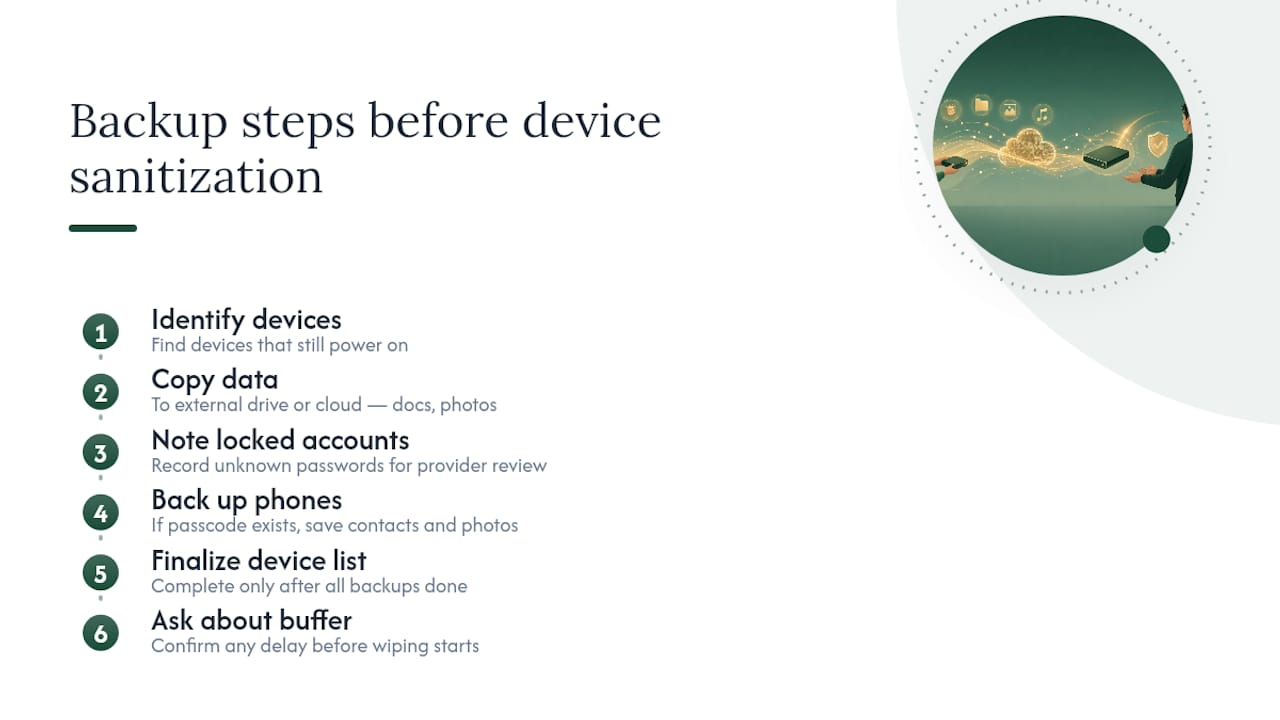
Back Up First: Don't Let Sanitization Erase Something You Needed
Sanitization is permanent by design, so anything you might want, family photos, financial records, old emails, needs to be copied off before a device gets wiped or destroyed.
The FTC recommends backing up files before handing off any device, and that advice matters even more in an estate context, where you may not know what's actually stored on a deceased relative's laptop until you look.
A practical approach: before the crew arrives, spend an hour connecting any computer that still powers on to an external drive or a cloud account, and copy over documents, photos, and anything that looks personal. If a password is unknown and the account is locked, note that on your device list so the provider knows not to assume the drive is empty of anything worth checking. For phones, the same logic applies. If a passcode is available, back up contacts and photos before the device is handed off for wiping.
Do this before you finalize your device list for sanitization. Once a drive goes through a purge or destroy cycle, there's no walking it back. Ask the provider whether they build in a short buffer window between pickup and processing. That gap gives you room to realize something was missed without losing it permanently.
Where Wiped Devices Actually Go: Environmental Responsibility
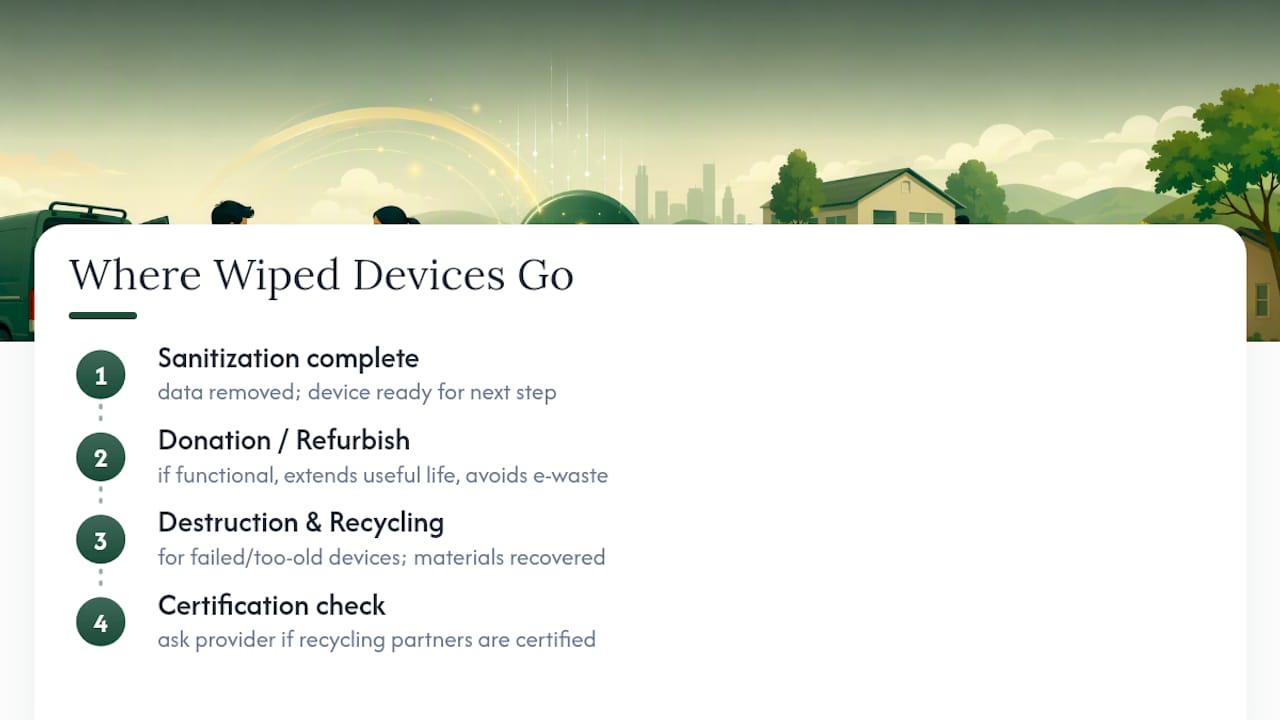
Sanitization solves the data problem, but a wiped device still has to go somewhere, and that's where certified e-waste handling comes in.
Computers and phones contain materials, lithium batteries, lead solder, rare earth elements, that shouldn't end up in a regular landfill. A certified recycling program follows documented protocols for breaking down devices responsibly, recovering reusable materials, and keeping hazardous components out of the waste stream.
This is also where the donation-first sequencing pays off twice. A device that's sanitized and still functional goes to a charity or refurbisher, extending its useful life instead of adding to e-waste volume. Only devices that fail sanitization, or that are too old or damaged to be useful, move to destruction and certified recycling. That's a better outcome than a household defaulting to "throw it in the regular trash" because nobody wanted to deal with the electronics separately.
Ask your provider whether their recycling partners hold a recognized certification. It's a quick question, and the answer tells you whether "responsible disposal" is a real process or just a phrase on a flyer.
Where the Usual Advice on This Falls Short
Most guidance on wiping a computer before donation assumes you're the original owner sitting at your own desk, calmly clicking through a factory reset. Executors don't have that luxury. You're often working through a stranger's password habits, unlabeled external drives, and a machine that hasn't been touched in years, all while managing a dozen other estate tasks.
That's why I think the standard advice undersells documentation. Certification badges and sanitization methods matter, but the paper trail is what actually protects you if a data privacy question surfaces during probate months later. A signed certificate with a serial number is worth more than a provider's verbal promise that "everything gets wiped."
If you take one thing from this, prioritize the questions you ask before the crew shows up, not after. Once devices are gone, you can't retroactively demand a chain-of-custody log. Get the certification, the method, and the paperwork terms settled at the walkthrough, while you still have leverage to ask.
— Derek
How Bereavement Cleanout Services Handles Your Electronics
Bereavement Cleanout Services builds sanitization into the same donation-first process used for the rest of the estate, so you're not coordinating a separate vendor just for computers and drives. Every device gets sorted, assessed, and routed alongside the keepsakes, furniture, and everything else, with the same broom-clean handoff guarantee applied to the whole job.
When you book a cleanout, ask directly what sanitization method will be used on any computers or phones in the home, and request the signed documentation for your probate file before the crew leaves. That single conversation at the walkthrough saves you from chasing paperwork later. Full house and apartment cleanouts, hoarding cleanups, and large estate cleanouts may include handling of electronics as part of their process. Start with a walkthrough and quote to see how it fits your specific situation.
Sources
- Guidelines for Media Sanitization, NIST SP 800-88 Rev. 2 (2025)
- The importance of certified electronics recycling — e-Stewards
FAQ
Does a Cleanout Crew Really Wipe Computers Before Donation?
Yes, a donation-first provider sanitizes or destroys storage media before any device is routed to a charity, using methods aligned with NIST SP 800-88 Rev. 2. You should receive documentation confirming which method was applied to each device.
What's the Difference Between Wiping and Destroying a Drive?
Wiping (clear or purge) uses software to overwrite or cryptographically erase data while keeping the drive usable. Destruction physically shreds or crushes the media, which is required when a drive is damaged or can't be verified as fully sanitized.
Do I Need to Back Up My Loved One's Computer First?
Yes. The FTC recommends backing up files before any device is wiped, since sanitization is permanent. Copy photos, documents, and anything personal to an external drive or cloud account before the device goes to the crew.
What Paperwork Should I Get for My Probate File?
Ask for a signed destruction or sanitization certificate listing the device's serial number, date, and method used, plus a donation receipt if the device went to charity. Keeping this with your device inventory and photos protects you if a question comes up later.
How Much Does Bereavement Cleanout Services Charge for a Full Cleanout?
Pricing for full house cleanouts varies depending on the home's size and condition; see the provider's site for current rates. Check the Bereavement Cleanout Services site for current rates on other services like apartment cleanouts or hoarding cleanup.